
Main menu
You are here
Working with equations : Equation bar
The equation bar
The equation bar offers a quick and simple way to enter equations for any elements on the model diagram.
- Select the pointer tool

- Click on the element whose equation you wish to edit.
The name of the element is placed on the left hand side of the equation bar.
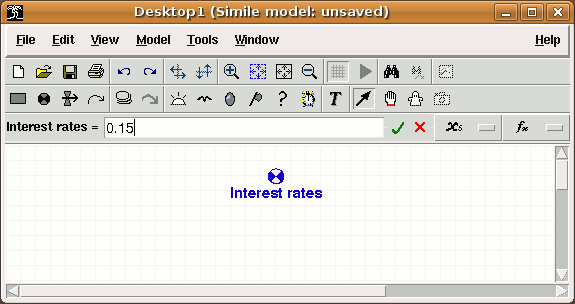
- Click on the equation bar edit box to enter a value or an expression for the element.
- Click on the
 button, or hit return, to set the equation.
 - Click on the
 button if you make a mistake. It restores the previous entry.
Elements which are calculated from other elements, i.e. are at the end of one or more influence arrows, have the local names of those elements listed in a drop-down list under the  button.
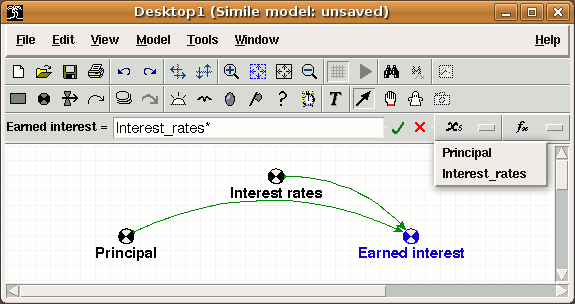
- Click on any name listed in the drop-down box to enter it into the equation. The name is added at the position of the cursor in the equation text.
A selection of the most-commonly used functions are listed in a menu cascade under the  button. The top level of this cascade also contains an entry labelled "Enum. type constants", for adding the names and members of any enumerated types defined in the hierarchy containing the selected component. This also allows access to the "boolean" unit type and its values.
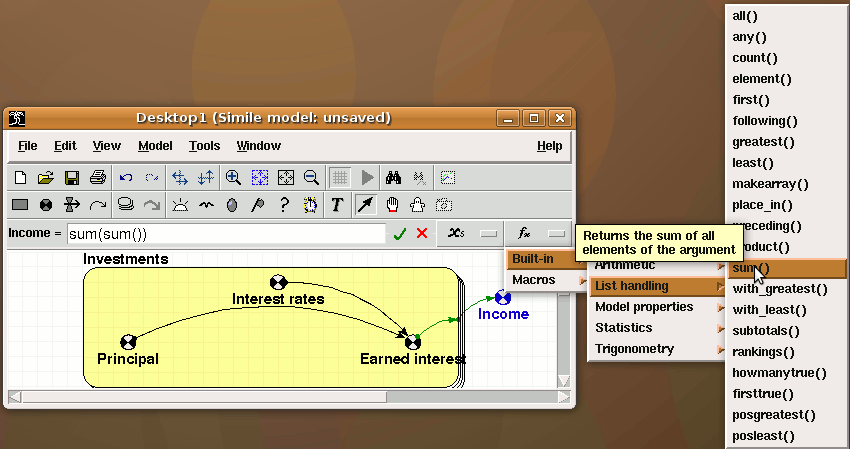
- Click on any function that appears in the menu cascade to enter it into the equation. The function is added at the position of the cursor in the equation text, and the cursor is moved to inside the parentheses after the function, so you can immediately add its arguments. One more useful thing: if you select part of the text in the equation bar before adding a function from the menus, the function is added with its parentheses around the selection, so the selection becomes the argument.
Auto-complete feature
Typing in the equation bar activates the auto-complete feature. If the first few characters typed match the start of any entry in the cascade menu described above, i.e., valid input parameters, function names or enumerated type names or members, the remaining text in the shortest of those possible matches will be inserted into the text and highlit. The cursor moves to the end of the highlit text. The modeller can then do one of the following:
- Hit the left or right arrow, return or tab to keep the inserted text. If a function name has been completed, the text includes the pair of parentheses that will enclose its arguments, so hitting left-arrow will keep the completion and position the cursor within the parentheses ready to add the arguments.
- Hit the up arrow; this will select alternative completions from the same initial characters.
- Continue to type; the completion text will be ignored. Completions will continue to appear as long as the typed characters still match some menu entries.
Re-use previously entered equation
The entry field in the equation bar has a drop-down list containing equations previously entered in the current editing session. The list can be accessed by hitting down-arrow while editing the equation, or by clicking the down-arrow button to the right of the entry field. This is useful if you need to add similar equations for a lot of components (though you should think about using a single component in a multiple-instance submodel instead!) Also if you leave the equation bar and the equation produces an error message, you need to click on the component again to get back into the equation bar after which the equation you entered will be gone -- you can get it back from the drop-down list to edit it and fix the problem.
In: Contents >> Working with equations
- Printer-friendly version
- Log in or register to post comments