
Main menu
You are here
Running models : Working with visualization tools : Sliders
Sliders for Variable Parameters
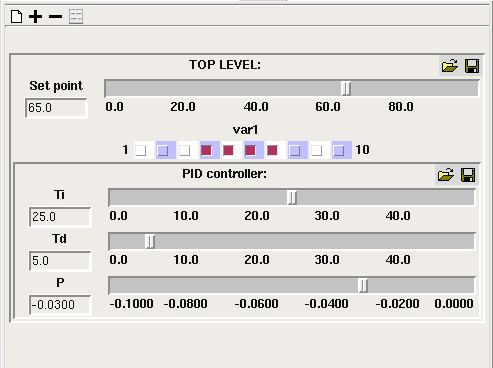
This window contains sliders (or switches, or combo boxes, depending on the data type) for variables marked as being "Fixed parameters" or "Variable parameters" in the equation dialogue box for those variables.
Choosing which vaues to display
You can use the  add button to add a slider for a model component if it is a fixed or variable parameter. The - button allows you to remove the slider for a particular model component. The
  "add all variables" button will add sliders for all model components marked as variable parameters, as it is for these that sliders are most usually required. The Clear button will remove all sliders. Sliders are grouped by submodel, if their variables are in different submodels.
Input widgets for different data types
On this page I am sometimes using the word "slider" to refer to an input widget for a model component, but it will only actually be a graphical slider if the component has a numerical value. In this case the slider will be drawn horizontally with a numerical legend with values between the component's minimum and maximum values as specified in the equation dialogue. If the component has an integer value, the slider will snap between integer points when it is dragged along the scale, otherwise it can be dragged smoothly along the scale. There is an entry box to the left of each slider, allowing a number to be typed in if you want to set the slider's position to an exact value.
Note that each slider is scaled individually according to the maximum and minimum values provided in the equation dialogue box. This information comes from the values for Min and Max entered in the Equation dialogue window. The initial value for the slider comes from the value entered into the Equation field of that window; if no value was given, then the slider is positioned at the mid-way point.
If the component has a boolean value, its entry widget will be a checkbutton. Checking the button sets the value to "true".
If the component's value is a member of an enumerated type, the entry widget is a combobox with a pulldown list of the type's members, allowing you to choose one.
Sliders for multiple values
Adding a slider for a variable with multiple values (e.g., from a multiple-instance submodel) will cause a group of input widgets to be added. The variable's caption appears above, rather than to the left of, the sliders, and each one has an index to the left indicating which model value it affects. If the values form a one-dimensional array, there will be a single input widget for each value. However, if the array is more than one-dimensional, there will only be a separate slider for each inermost index. Moving a slider will set all the values with that innermost index.
You cannot add a slider for a model component inside a variable-membership (e.g., population) submodel.
Interaction with the model (changed in v6.8)
Moving a slider directly affects the corresponding value in the model. If the model is not actually running when the slider is moved, an extra rate evaluation is immediately performed in order that other model values that depend on the slider are also immediately affected. This does not affect state variables such as compartment values. After this rate evaluation is done, the visualization tools are updated so the values being displayed are those resulting from the slider move. For example this update may produce a vertical line on the plotter between the old and new values.
Resetting the model now causes variable parameters to go to their default values. Sliders will move to the default values by themselves on reset. So, to use a slider to run a model with different values from reset, the slider should be adjusted to the initial value after reset but before starting the model run, which now causes the value to take effect at the initial time. Simile v6.9 also includes a preference choice to allow sliders to keep their values over model reset. To choose this option, uncheck 'reset sliders on model reset' in the Run tab of the preferences window.
For fixed parameters, setting the value with a slider has the same effect as setting it in the file parameters dialogue box. That is, no change will occur until the next model reset. If you adjust an input widget, the model will prompt you to reset it before continuing to run in order that the change takes effect. The sliders cannot be adjusted while the model is running.
The slider for a value will move by itself in response to a change in the component's value caused by something else when the model is running. Thus, if you have a slider associated with a variable parameter which also receives values from a time series, the slider will move to the value for each time point as that time arrives. A slider associated with a fixed parameter compartment will move to follow the compartment's value as the model runs, but cannot be adjusted until the model in paused, after which the adjustment only takes effect when the model is reset.
In: Contents >> Running models
- Printer-friendly version
- Log in or register to post comments